Table of Contents
- What You’ll Need Before Getting Started
- How Field Service Management Software Works for Trades
- Benefits of FSM Software for Small Contractors
- Field Service Dispatch Mapping Tools Explained
- Improving Billable Hours With Software
- Implementation and Getting Your Team On Board
- Common Mistakes to Avoid
- Frequently Asked Questions
Last Updated: September 28, 2026
What You’ll Need Before Getting Started
Before implementing field service management software, ensure each technician has a smartphone or tablet (iOS or Android), reliable internet connectivity for cloud syncing, and a clear map of your current workflow, how jobs move from dispatch to invoice, what your dispatcher needs, and where technicians struggle. This clarity accelerates implementation.
How Field Service Management Software Works for Trades
Field service management software is a mobile-first platform that connects your office to your field team in real time. It automates scheduling, tracks technician location, captures job details on-site, and generates invoices automatically. For small HVAC, plumbing, and electrical contractors, it replaces scattered spreadsheets and phone calls with a single source of truth.
The cloud backend is where all your business data lives. When a customer books a service, that information is stored in a central database. Your dispatcher, technicians, and office staff all access the same data in real time. The backend also runs the logic that powers dispatch optimization, it calculates which technician is closest, has the lightest schedule, and possesses the right skills for the job. This happens in seconds, not the minutes it takes a human dispatcher to make phone calls.
The backend also handles offline sync. When a technician works in an area with poor connectivity, their mobile app caches job data locally. Once they reconnect, the app syncs all changes, photos, notes, time entries, parts logged, back to the cloud. This is critical for trades, since job sites often have spotty cell service. The software doesn’t fail; it just queues updates until bandwidth returns.
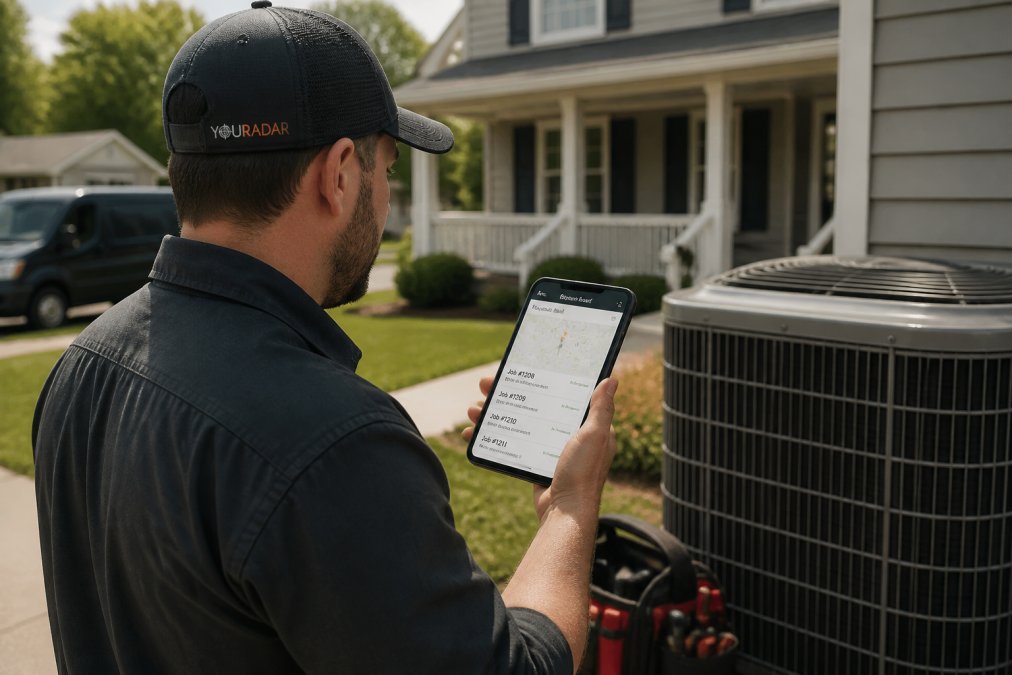
The mobile app displays assigned jobs by priority, showing customer address, phone number, service history, and previous notes. Built-in GPS navigation eliminates the need for separate maps. Technicians clock in on arrival, triggering a timer and optional customer notification.
During the job, technicians document everything: photos auto-attach to work orders, parts are logged via barcode or manual entry, and time is tracked by task (diagnosis, repair, cleanup). Many platforms enable on-site digital quotes, technicians select parts and labour, apply markup, and email for customer approval without office visits.
On completion, the technician submits the job, sending all field data, photos, notes, time entries, parts, signature, to the cloud in one transaction.
The integration layer connects FSM software to accounting tools (QuickBooks, Sage), payment processors, and CRM systems. Invoices created in the FSM system automatically sync to accounting records, eliminating manual data entry and information silos. Customers receive invoices via email, and payments sync back automatically.
The workflow is automated end-to-end: customer call → work order creation → system-assigned technician → mobile job receipt → on-site documentation → job submission → automatic invoice generation → customer payment → accounting sync. The dispatcher avoids phone calls, technicians skip office paperwork, and the office eliminates manual invoicing, freeing your team for service delivery and customer relationships.
Benefits of FSM Software for Small Contractors
Key benefits include reclaimed time (less dispatcher coordination, office invoicing, and technician paperwork), improved billable hours (more jobs per day, faster payment), better customer communication (arrival notifications, instant invoices, service portals), and workforce visibility (performance metrics, job duration patterns, scheduling bottlenecks) that inform hiring, pricing, and resource decisions.
Field Service Dispatch Mapping Tools Explained
Dispatch mapping is the visual backbone of FSM software. Your dispatcher sees all technicians as dots on a map. They see all pending jobs as pins. With a few clicks, they assign the closest technician to the next job.
This sounds simple, but it saves hours per week. Instead of calling technicians to ask where they are, the dispatcher sees it. Instead of guessing who can take a rush job, the system shows availability. Routing becomes logical instead of chaotic.
Advanced mapping tools factor in traffic patterns and travel time. The software calculates the fastest route between jobs. Some platforms suggest the optimal sequence for a technician’s day to minimize driving time. This reduces fuel costs and increases the number of jobs completed daily.
The map also tracks job status in real time. Your dispatcher sees which jobs are in progress, completed, or waiting for customer approval. This visibility prevents jobs from slipping through cracks.
Improving Billable Hours With Software
Billable hours are the lifeblood of trades. Every minute not tracked is money left on the table. FSM software captures every minute automatically, but the real value lies in understanding your ROI and identifying where hours are being lost.
Automatic time capture eliminates leakage. When technicians clock in and out through the app, the system records exact start and end times. No rounding down. No forgetting to log time. No arguments about what happened on-site. The data is there. Many contractors discover they’re losing 30 minutes to 2 hours per technician per week simply because time wasn’t being tracked at all. A technician might spend 20 minutes driving between jobs but never log it. They might spend 15 minutes on the phone with the dispatcher clarifying a job address. They might spend 30 minutes waiting for a customer to be home. Without FSM software, these minutes vanish. With it, they’re billable.
Granular task tracking shows where efficiency gains are possible. The software allows technicians to log time by task: diagnosis, repair, parts installation, cleanup, customer consultation. This granular data reveals patterns. You might discover that diagnosis takes 45 minutes on average, but your fastest technician does it in 25 minutes. You can then train others on that technician’s approach. Or you might find that a particular job type consistently takes longer than your estimate. You can adjust your pricing or scheduling to account for that reality.
Parts and materials are captured at the point of use. When a technician logs a part through the app, it’s instantly added to the invoice. No more manual data entry. No more forgotten charges. Everything the technician used gets billed. For HVAC contractors, this might mean capturing refrigerant, filters, and capacitors. For plumbers, it’s fittings, valves, and sealant. For electricians, it’s breakers, wire, and fixtures. A single forgotten part on a job might represent $50 to $200 in lost revenue. Across 10 technicians over a year, that’s significant.
Calculating your ROI. To justify the software investment, work through this framework:
-
Measure current billable hours per technician per week. Ask your team to track their time manually for two weeks. Most contractors find they’re billing 30 to 35 hours per week when they should be billing 38 to 40 hours (a standard work week). The gap is lost time, driving, waiting, admin, communication.
-
Estimate recovery. FSM software typically recovers 2 to 5 hours per technician per week by eliminating time gaps and automating admin. Use a conservative estimate of 2 hours per technician per week.
-
Calculate the value. If your average billable rate is $100 per hour (adjust for your market), 2 hours per week per technician is $10,400 per year for one technician. For a five-technician crew, that’s $52,000 per year in recovered billable hours.
-
Factor in faster invoicing. When invoices go out the same day instead of waiting 3 to 5 days for office processing, you get paid faster. For a contractor with $50,000 in monthly revenue, accelerating payment by 3 days improves cash flow by $5,000. Over a year, that’s meaningful.
-
Subtract the software cost. Most FSM platforms cost $50 to $150 per technician per month. For five technicians, that’s $3,000 to $9,000 per year. Even at the high end, your recovered billable hours ($52,000) and faster cash flow far exceed the cost.
Real-world example: A plumbing contractor with four technicians was billing an average of 32 hours per week per technician. After implementing FSM software, they recovered 2.5 hours per week per technician through better scheduling, eliminated admin time, and faster invoicing. At $95 per hour (their local market rate), that’s 10 hours per week × $95 = $950 per week, or $49,400 per year. The software cost $4,800 per year. Payback occurred in 5.8 weeks.
Parts and materials accuracy adds another layer of ROI. Contractors often underestimate how much they’re leaving on the table by not billing for every part used. A conservative estimate is that 5 to 10 percent of parts go unbilled due to forgotten entries or manual invoicing errors. For a contractor with $100,000 in annual parts revenue, that’s $5,000 to $10,000 in lost revenue.
Implementation and Getting Your Team On Board
Implementation is where many software projects fail. The tool is great, but your team doesn’t use it. Here’s how to avoid that.
Common Mistakes to Avoid
The biggest mistake is underestimating change resistance. Your dispatcher has done things the same way for five years. Your technicians are comfortable with their routine. Software disrupts that. Expect pushback. Plan for it.
Frequently Asked Questions
Is field service management software really necessary for a small trade business with fewer than 10 employees?
Yes. Even small teams benefit from automated scheduling, reduced administrative time, and better job tracking. The software eliminates manual coordination between office and field, reduces billing errors, and increases billable hours, all critical for profitability at any size. Many small contractors find that one person spending hours on scheduling and invoicing can refocus on revenue-generating work once FSM software handles those tasks.
How does field service dispatch mapping help reduce travel time and fuel costs?
Dispatch mapping tools optimize route planning by automatically assigning jobs to the nearest available technician and sequencing stops to minimize backtracking. Real-time GPS tracking lets dispatchers adjust routes on the fly when urgent jobs come in. This reduces wasted driving time, cuts fuel consumption, and allows technicians to complete more jobs per day, directly improving billable hours and operational efficiency.
What happens if my team won’t actually use the mobile app after we implement it?
Adoption depends on ease of use and clear ROI communication. Non-technical teams need simple interfaces with minimal steps per task. The best approach is starting with core features (job details, time tracking, photo capture), letting technicians see immediate benefits like faster invoicing or fewer dispatch phone calls. In-house support teams can provide ongoing training and troubleshoot resistance early. Most resistance fades once users see it saves them time.
Can field service management software integrate with our existing accounting software?
Most FSM platforms integrate with QuickBooks, Xero, and other accounting packages, automatically syncing invoices, payments, and job costs. This eliminates manual data entry, reduces billing errors, and gives you accurate financial reporting. Check integration availability before selecting a platform, as some solutions offer deeper accounting connections than others. Integration quality directly affects how much administrative time you actually save.